

Add someone to your team
Give a colleague access to your business with the role they need.
- Who can do this:
- Owner · Admin
- Plan:
- Every plan, including Free
- Last updated:
Before you start
- Each team member needs their own Battut account.
- A free team seat on your plan. See Team seats and your plan.
Steps
- Step 1:
Open Settings and find Team. The seats line shows how many seats are in use.
- Step 2:
Enter their Battut username or user ID, for example @username.
- Step 3:
Choose a Role. The text under it explains what the role can do.
- Step 4:
Select Add member.
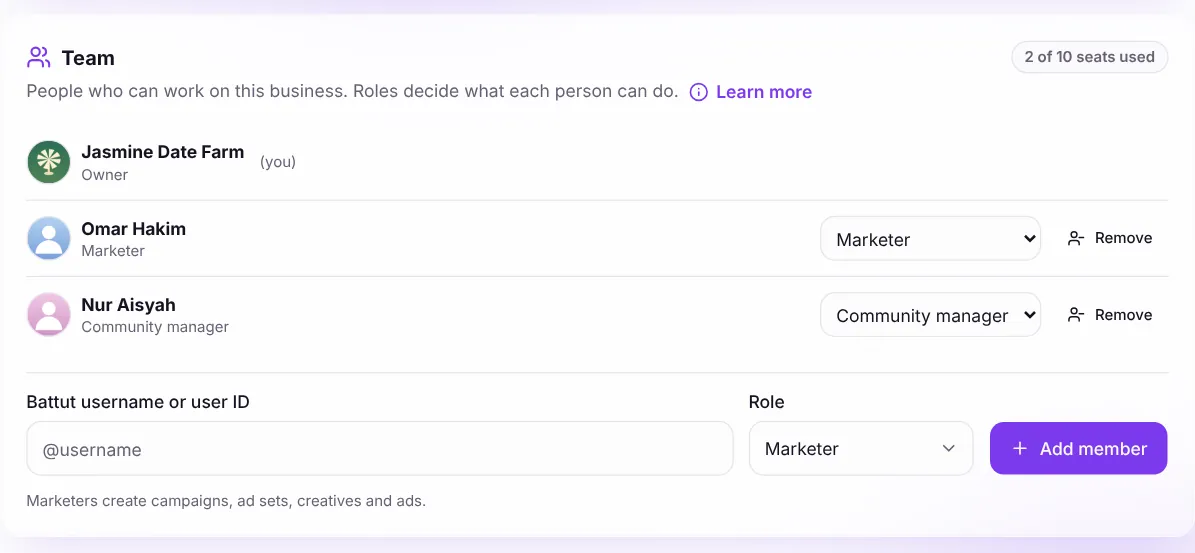
Screenshot:Add people and choose their role in Settings.Sample business and numbers. Your screen shows your own.
What happens next
- The person can sign in to business.battut.app and sees only what their role allows.
- To change a role later, use the Role menu next to their name. To take access away, select Remove.
- Owners and admins can see what each person changed under Recent team activity.
Common questions
Every seat is in use. What can I do?
Remove someone who no longer needs access, or move to a plan with more seats. Pro can add extra seats.
Related articles
Was this article helpful?