

Pay by card or FPX
Pay for your plan with a card that renews, or with FPX online banking for a fixed period.
- Who can do this:
- Owner · Admin · Finance
- Plan:
- Every plan, including Free
- Last updated:
Before you start
- The role of owner, admin or finance.
Steps
- Step 1:
On Plans & billing, select Choose Business or Choose Pro.
- Step 2:
On Pro, use Add a seat if you need Extra team seats.
- Step 3:
To pay by card, find Pay by card and select the Pay … by card button. Stripe opens a secure payment page.
- Step 4:
To pay with your bank, find Pay by FPX / online banking, choose 1 month, 3 months or 12 months, and select the Pay … with FPX button.
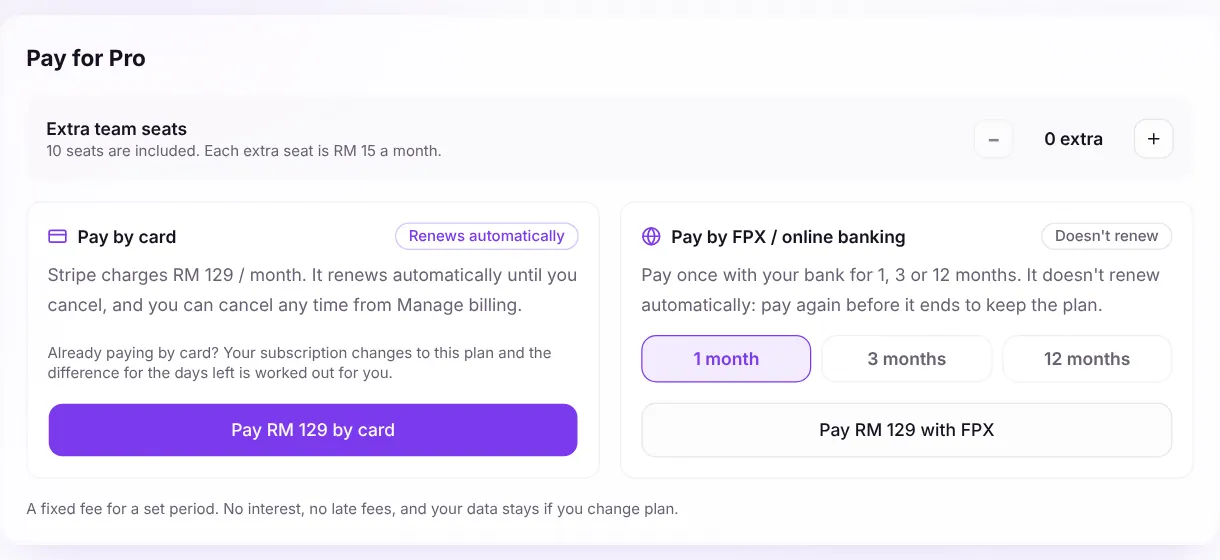
Screenshot:Card renews automatically. FPX is paid once for a set period.Sample business and numbers. Your screen shows your own. - Step 5:
Finish the payment on the secure page. You come back to Plans & billing when it is done.
At a glance
| Card (Stripe) | FPX / online banking (CHIP) | |
|---|---|---|
| How it works | Renews automatically until you cancel | Pay once for 1, 3 or 12 months |
| Renewal | Automatic | Doesn’t renew: pay again before it ends |
| Change plan | Changes in place; the difference for the days left is worked out for you | Buy the new plan when the current period ends |
| Manage | Manage billing: change card, receipts, turn off auto-renew | Pay again to extend |
What happens next
- You see “Payment received. Your plan updates in a moment.” and the Your plan card updates.
- An invoice appears under Invoices. See Find invoices and receipts.
Common questions
The payment was cancelled. Was I charged?
No. If you see “Payment cancelled” or “The payment didn’t go through”, nothing was charged.
Can I buy extra seats on a yearly card plan?
No. Extra seats are billed monthly. Pay monthly by card, or by FPX, to add them.
Related articles
Was this article helpful?