

Filter comments by keyword
Hide new comments with words you choose, before anyone sees them.
- Who can do this:
- Owner · Admin · Marketer · Community manager
- Plan:
- Business or Pro
- Last updated:
The comment filter holds back new comments that use your words or contain links. They wait in Hidden for you to show or delete.
Before you start
- A Business or Pro plan. Comments already hidden stay hidden if the plan ends.
Steps
- Step 1:
Open Comments and choose Filter.
- Step 2:
Under Words and phrases, type a word or phrase and press Enter, or select Add.
- Step 3:
Turn on Hide comments with links if you want links held back too.
- Step 4:
Select Save filter.
- Step 5:
To review what was held back, choose Hidden. Select Show to put a comment back, or Delete to remove it for good.
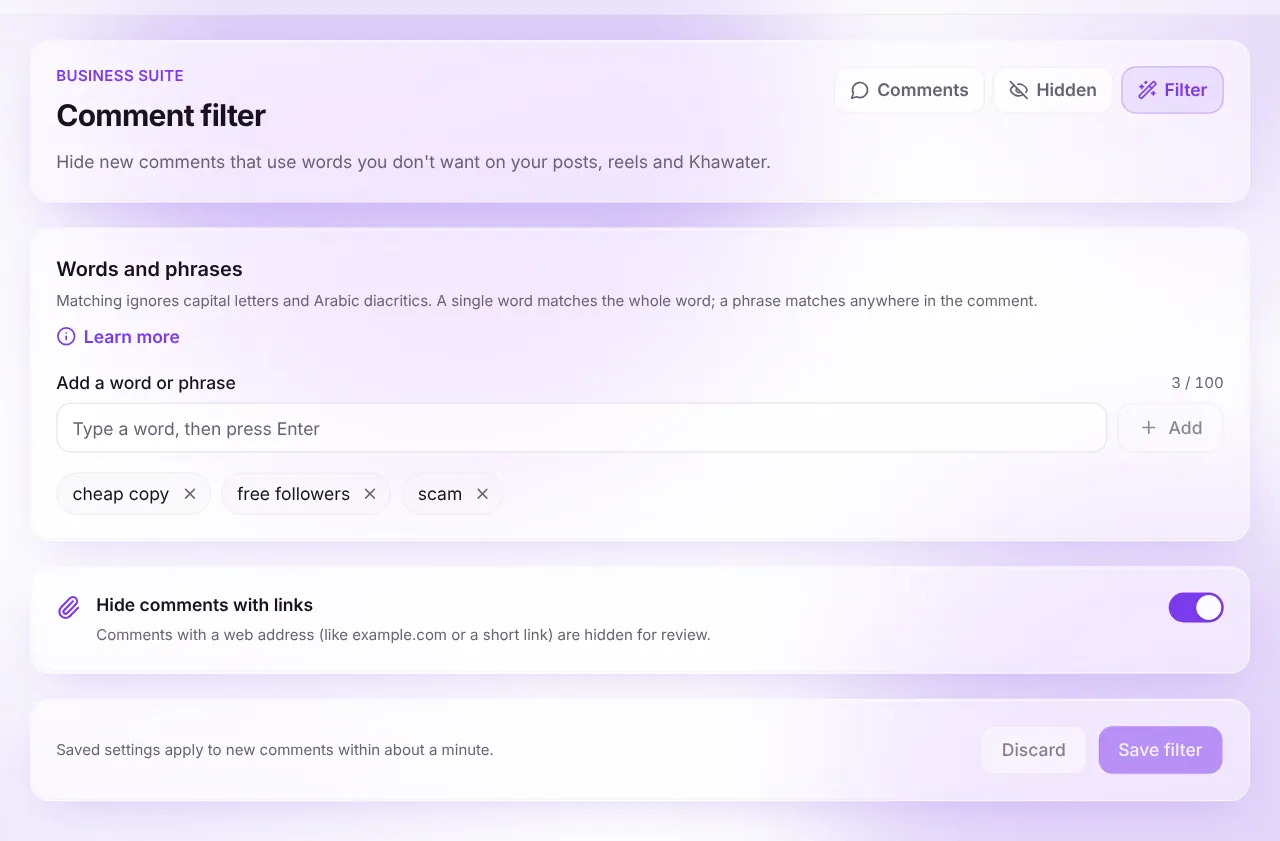
Screenshot:Add the words you don’t want on your posts.Sample business and numbers. Your screen shows your own.
What happens next
- Matching comments go to Hidden instead of your post. The person who wrote them isn’t told.
Common questions
Does the filter check my own comments?
No. Your own comments, comments you restored and comments on ads are never filtered.
Related articles
Was this article helpful?