

Hide like counts and turn off comments
Choose, post by post, whether others see likes and whether people can comment.
- Who can do this:
- Owner · Admin · Marketer
- Plan:
- Every plan, including Free
- Last updated:
These controls are free on every plan and work on posts, reels and Khawater.
Steps
- Step 1:
When you create a post, find Post settings and turn on Hide like count or Turn off commenting.
- Step 2:
For something you already posted, open Content and select the post.
- Step 3:
In the Settings section, switch Hide like count or Turn off commenting on or off. The change saves at once.
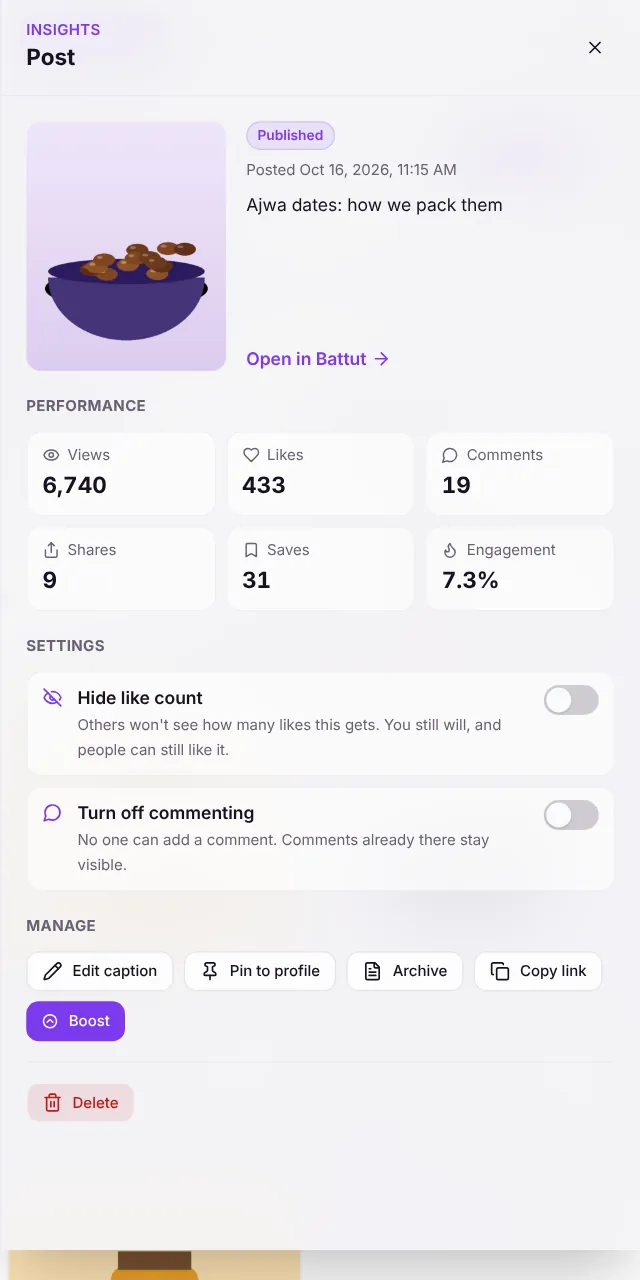
Screenshot:Settings sits in each post’s insights panel.Sample business and numbers. Your screen shows your own.
What happens next
- The post shows a Likes hidden or Comments off chip in Content, so you can see the setting at a glance.
Common questions
Do older versions of the app respect these settings?
Older apps may still show the like count, but Battut refuses new comments on a post with commenting turned off on every app.
Related articles
Was this article helpful?