

Pause, extend or stop a boost
Control a running boost and get unused BT back.
- Who can do this:
- Owner · Admin · Marketer
- Plan:
- Every plan, including Free
- Last updated:
Steps
- Step 1:
Open Boosts. Use the filters All, Running, Paused and Ended to find the boost.
- Step 2:
To take a break, select Pause. Select Resume to carry on. The days left wait while it is paused.
- Step 3:
To give it more time or money, select Extend. Use Add days or Raise the daily budget, check what is Held now, then select Extend boost.
- Step 4:
To end it for good, select Stop boost, then Stop. The BT not spent goes back to the balance.
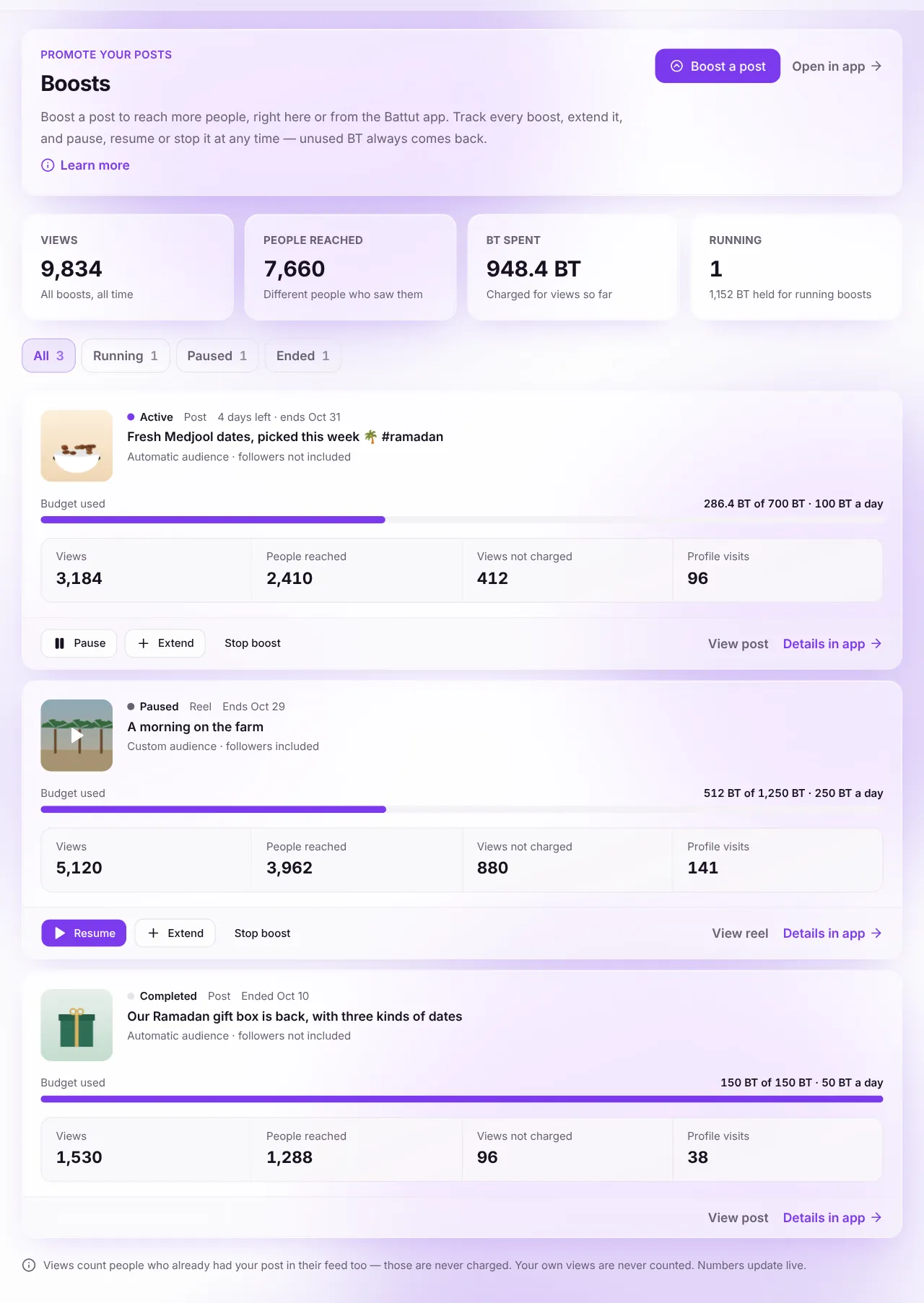
Screenshot:Each boost shows its budget, results and controls.Sample business and numbers. Your screen shows your own.
What happens next
- When a boost ends or is stopped, its card shows how much BT was returned.
Common questions
What happens if a boost is paused for a long time?
A boost paused for more than 7 days in total is stopped and settled automatically, and the unused BT comes back.
Why can’t my role change boosts?
Owners, admins and marketers can start and change boosts. Other roles can see them but not change them.
Related articles
Was this article helpful?