

Verify your business
Send proof that your business is real to get the Verified Business icon and run ads.
- Who can do this:
- Owner · Admin
- Plan:
- Business or Pro
- Last updated:
Verification confirms that a real business is behind the account. Once Battut approves it and your plan includes it, your business shows the Battut Business icon next to its name and its ads can run. The icon confirms identity only. It does not certify your products or their Shariah compliance.
Before you start
- A business profile. See Set up your business.
- Proof such as your website domain, a business email or phone, or a registration certificate or licence (PDF, JPG, PNG or WebP, up to 10 MB each, at most 5).
- For the icon to show, a Business or Pro plan. A free trial doesn’t include the icon.
Steps
- Step 1:
Open Settings in the sidebar and scroll to Verified business.
- Step 2:
Fill in Legal name and Contact email. Add Contact phone and Website if you have them.
- Step 3:
Choose a Proof method and enter the Proof value, for example your domain or business email.
- Step 4:
Under Business documents, add your registration certificate or licence.
- Step 5:
Select Submit verification proof.
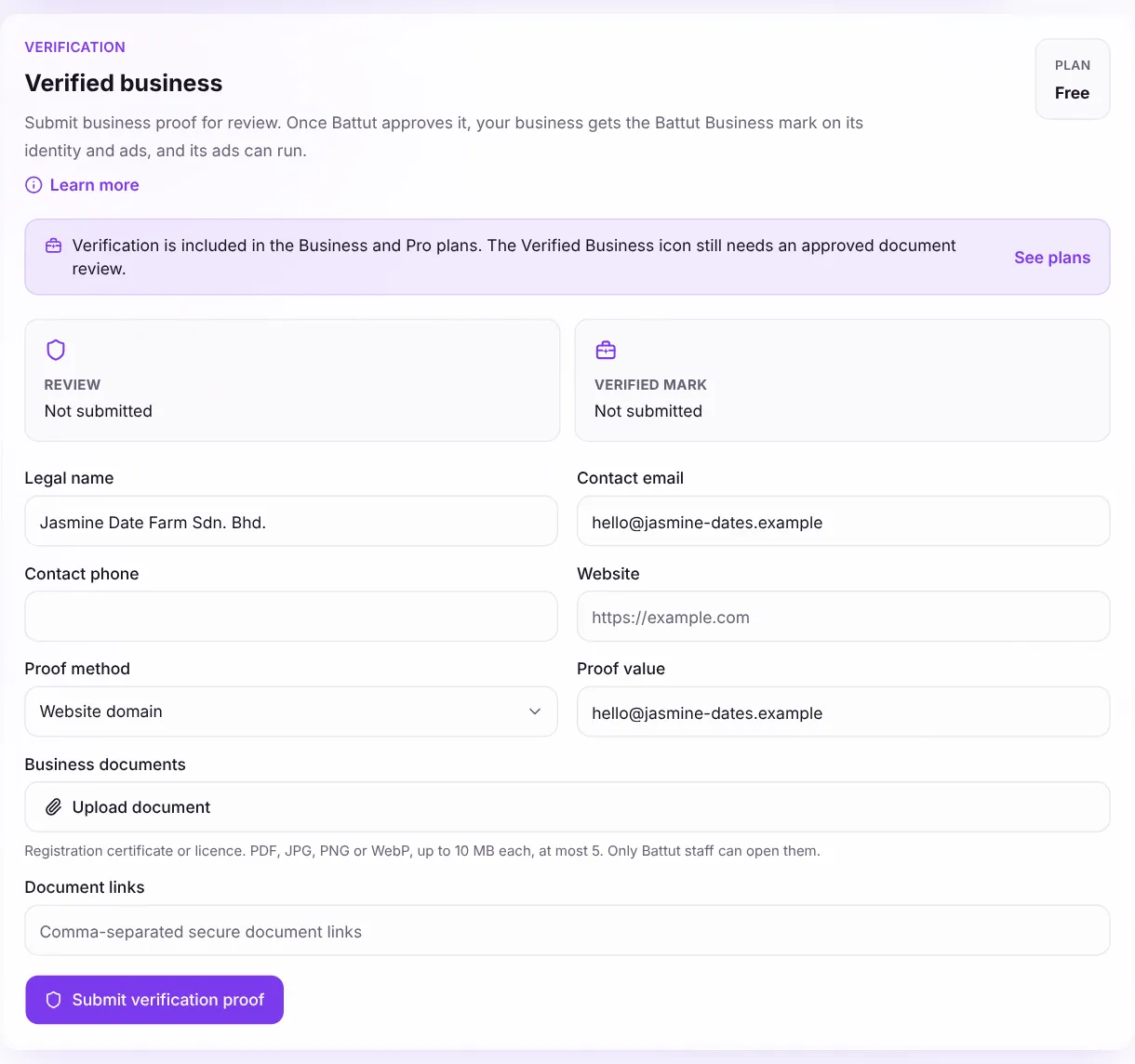
Screenshot:Verification lives in Settings, below your team.Sample business and numbers. Your screen shows your own.
What happens next
- The review status changes to Submitted, then Battut checks your proof. You get the answer in your notifications.
- If it’s approved and your plan includes verification, the status changes to Verified and the icon appears. If you’re on Free, pick Business or Pro to switch it on.
- If Battut asks for changes, you see a Note from Battut. Fix the proof and select Update submitted proof.
Common questions
Can I change my business name after verification?
Not from the portal. A verified name and logo are locked. Contact support to change your verified identity.
Do I need to verify to boost a post?
A business account needs to be verified to boost. Battut Plus members and approved creators can boost from the app without it.
What happens if my plan ends?
The review stays approved, but the icon switches off until a Business or Pro plan is active again.
Related articles
Was this article helpful?